


Supercharge Your WP Blog with this Full-featured Visual, Rich-text Editor
How would you like to turn this:
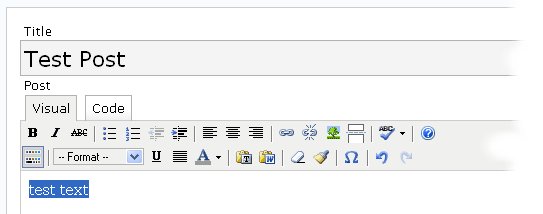
into this?:
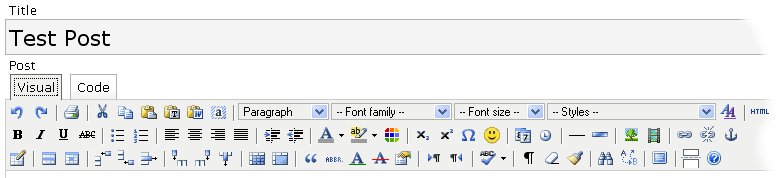
and, in the process, correct other WordPress visual editor problems and make it easier to maintain and extend for editor functionality? Then, welcome.
WordPress’ existing rich-text editor is a modification of the TinyMCE JavaScript WYSIWG text editor. However, the WP project team modified the standard distribution in ways that tend to break the linkage with independent TinyMCE developments, limit available functionality, and change the editor’s behavior.
This new Advanced TinyMCE Editor, which builds upon successful earlier distributions, has been developed for WordPress v. 2.2. It:
- Doubles the editor’s available functions to 60, adding important functional areas such as table, styles, inserts, and others
- Improves existing functionality in handling images, links, etc.
- Corrects errors and (what I would assert to be) arbitrary restrictions in the standard WordPress visual editor, and
- Provides cleaner and (hopefully) easier ways to maintain and configure your WordPress editor yourself.
Please CLICK HERE to download the plug-in, get installation instructions, read detailed documentation, learn how to modify, or see additional background.
This is WAY COOOL!!! Thanks Michael was creating such a powerful plug in for WP!
TKS
🙂 SNS
Greetings,
This sounds like a pretty brilliant way of expanding the way we write things in our blogs, personally I use MS-Live Write, but when I m away from my computer, at a friend’s place for example, I use the TinyMCE, now this is going to help me out there…
One question though, will this prevent TinyMCE comments from working (http://mk.netgenes.org/my-plugins/mcecomments/) ?
Thanks !
peace
-mE
Advanced TinyMCE Editor does not display properly in the latest version of WordPress if you have any other plugins that add buttons to the editor. I disabled the ST Visualize Advance Features plugin but there are still problems with Viper’s Video Quicktags plugin. The plugins themselves work; however, the buttons are only visible when you toggle to full screen as they are not arranged properly in rows visible when using the editor. Hope this can be addressed as it appears to be quite an improvement over the current editor in WP.
@Tom,
You may want to double-check clearing your browser cache; this sounds like a typical cache problem. Also, there could be plug-in effects. I’ll keep monitoring these comments to see if others have similar problems.
BTW, I have gotten ImageManager to display properly with its button (though it has other WP 2.2 compatibility issues).
Mike
I can’t get cut cut and paste to work in firefox, I’ve created a user.js and added what I think is the correct http line, but no luck, any ideas?
;; Ray
If your using Firefox, you must create a user.js file in the your pref file and add the following lines to it. substitute http://www inthemac.com with your own site and you’ll be able to cut and paste.
add these lines to user.js (Create if missing) and make sure if on a Mac system that the extension is not “Hidden” in get info.
user_pref(“capability.policy.policynames”, “allowclipboard”);
user_pref(“capability.policy.allowclipboard.sites”, “http://www.inthemac.com”);
user_pref(“capability.policy.allowclipboard.Clipboard.cutcopy”, “allAccess”);
user_pref(“capability.policy.allowclipboard.Clipboard.paste”, “allAccess”);
This is really awesome…The kind of functionality that it gives just blows me away. I would rate this one of the best wordpress plugins..
Thank you! !
Some one help!
the problem on my uploading this plugin.
1. i already upload my file on wp-content/plugins/advanced-tinyMCE.php
2. i also upload my file on /httpdocs/wp-includes/js/tinymce/plugins/ all the sub directory of plugins here.
then i go under the plugin to active this plugin.after i activate it. so i go to Write a post. n the plugin isn’t work.
n now my toolbar is gone like this picture.
http://img338.imageshack.us/img338/155/phpc79su3.jpg
plz some one help me to solve my problem
2tomato45un,
First, follow instructions to fully clear your browser cache.
Two, make sure you have WP 2.2.
Three, if neither of those work, remove the plug-in; there must be some other conflict that I can not help you diagnose further.
Mike
Mike still can’t i already clear the browser cache. (still can’t work) my toolbar still won’t view (gone).
the second i got the wordpress 2.2
after this plugin won’t work so far, so i decided to remove the plug-in. when i delete advanced-tinyMCE.php n wit the whole under sub directory tinymce/plugins. now there is an error on write post my taskbar gone. >.
I’ve found the “add media” button to be a tad problematic for me when I was trying to add Youtube video with it. I wasn’t sure whether or not I had to past the entire Youtube embed commands they ave at their site.. or whether I just needed to type in the URL… but neither seemed to work.. it really messed up the graphics on my page.
I actually had to use the “code” part of the editor and do the old fashioned cut and paste of the embedded youtube URL (plus deleting several code lines that WordPress doesnt recognize) to get it to embed properly. I wondered if anyone else had that similar problem.
Nice plugin. The only problem I’ve had with it is the display is a little large, and goes under the comments category at the right. Oh, and for some reason, the insert link doesn’t work, it just pops up a blank box. But, it might be a firefox cache issue, which I’ve seemed to have a lot of problems with lately. (?!?)
@Ray Marotta: You can still use the keyboard strokes to cut, copy and paste without changing the js preferences, or if they’re not updating properly. CTRL+C for copy, CTRL+X for cut and CTRL+V for paste.
thanks for ADVANCED TINY MCE
I GOT IT WORKING AND EVEN INCLUDED (WORKING) WYSI WORDPRESS IMAGE LOADER- WITH A BROWSE FUNCTION AND USES IT IN CONJUCTION WITH THE TINY MCE IMAGE LOADER.
I WANT TO SUGGEST THE FOLLOWING!!
ON FUNCTIONS THAT IS SOURLY NEEDED – BROWSE GOOGLE AND LOOK FOR “WORDPRESS LINE SPACING” IS A LINE SPACING FUNCTION.
ALSO – COULD IT NOT WORK ON “COMMENTS”
I FOUND A SITE – PERHAPS YOU WOULD BE SO KIND AS TO LOOK AT IT, AS FOLLOWS FOR SOME IDEAS – http://baptiste.us/plugins/xinha4wp
KIND REGARDS
CHARLES VAN EEDEN
Hi,
Thank you very much for this superb, almost perfect, plugin! I love it.
Greetings from Sweden
Does this work with safari? The default wordpress editor doesn’t.
After installing Advanced TinyMCEI experience slow response (30-40 seconds) if I go to write post first time, then next times it is about 10 seconds. I use Firefox 2 and WP-cache; When the page loads, the loading if the buttons is very slow.
… a second problem is that some of the icons at the right overlap with the categories sidebar, in total about six. This happens in Firefox AND IE. I can provide a screenshot.
@jolato,
The install page discusses the button overlap and what to do about it. The slow load times with WP-cache are not surprising; I earlier noted some plug-in interaction problems.
Mike
Thanks, saw the solution for the overlaps.
You mean that when not using WP-cache, loading is faster ? Could you please tell me where you discussed this ? Thanks. Jo
TinyMCE is notoriously slow to load. The developers have a compressor version which has a smaller footprint and loads faster using server-side gzip.
Regarding Safari and TinyMCE, it does work using the Safari 3.0.2 beta but not ver 2.x. However, there’s a WordPress 2.2.1 problem which strips the paragraph breaks. Might be a problem with the Webkit or WordPress or both. Short answer is Safari and TinyMCE in WordPress doesn’t work.
Neither of these issues are related to the plugin.
Crap ,, i cant even install mine ,,,
I get
PHP Parse error: syntax error, unexpected $end in C:\Inetpub\wwwroot\_blog\wp-content\plugins\advanced-tinymce\control_panel.php on line 65
When opening , well control panel , in WP options menu.
Reinstalled it , cleared browser history, played with PHP (only made it worse), deactvated all other plugins. No help…
Any suggestions?
I got the error as miki… Any ideas?
Actually, I fixed it… It’s a windows hosting issue and a slight error in the code. The small simple fix is either edit the php.ini to allow short tags (e.g:
ok so my last comment got ruined 🙁
Actually, I fixed it… It’s a windows hosting issue and a slight error in the code. The small simple fix is either edit the php.ini to allow short tags or on line 7 of control_panel.php add php to opening tag the programmer forgot it here.
Everything works except the tables icon buttons and the quote button
using wordpress 2.3 so Im not sure if that’s the issue
Will this also work with WordPress 2.5? 🙂
@Evert,
Early reports suggest it may not work with 2.5. Unfortunately, it will be a while until I can personally install 2.5 and look into the issue.
If anyone knows otherwise or has a fix, please post here! 🙂
Mike
man, i sure hope this plugin will work out any time soon in version 2.5
It was THE most favourite editor i’ve ever experienced while using WP.
I would hate to workj with a different one…please surprise it with a 2.5 compatible version 🙂
@roy,
Thanks for the compliments! I can’t promise a date yet, but we are looking into fixing the upgrade.
control_panel.php:7
<?
should read
<?php
Having fixed the PHP error I’m seeing a javascript fault:
h/wp-includes/js/tinymce/tiny_mce_config.php?ver=20080414 line 1001
tinyMCE.importPluginLanguagePack is not a function.
This is WordPress 2.5.
Yes.. awaiting a 2.51 compatible version… It was the better plugin until I decided to upgrade WP and.. no highlight etc. Of course you can achieve much by manually Html but…
Have just blogging seriously across several projects simultaneously, and Advanced TinyMCE is crucial. All my WordPress installations, though, are WordPress 2.5.1, so I will be incredibly grateful when you have upgraded your wonderful plug-in to work with 2.5.1!
Hello!
I’m a “johnny come lately” to your Advanced Editor, but it looks close to the best thing since sliced bread…. From the looks of it development has ground to a halt? Any chance of a version that is WordPress 2.7 compatible? I surely hope so!
Ken
Hi, I am using WordPress 2.7, WindowsXP and IE. The third row shows only 5 buttons – the table button being the one I really, really need! Any reason for this? Any advice of what is wrong or the fix?
Thanks
Harris
Does this editor work with the latest version of word press
and will it be a available in an update package. for folks that really don’t understand how to install this thing
There are current and working TinyMCE plugins that use the advanced functionality, and two good ones can be found here. On that page, there are links to two I recommend:
TinyMCE Advanced (use this one)
WP Super Edit (happy for feedback on this one)