
| NOTE: I have posted a major cleanup and update of what is now called the Advanced TinyMCE Editor, tested beginning with WP v. 2.2. Obtain the plug-in download and documentation HERE. The update announcement is now the best place to post new online comments and discussion. Let me know what you think! MKB |
Author's Note: There is a zipped plugin, code and documentation that supports the information in this post, which will allow you to extend the functionality of your TinyMCE rich text editor in WordPress; for immediate instructions see the end of the post below.
Click here to download the zipped file (101 KB)
My most recent post was about the smooth upgrade to WordPress v. 2.0.4 for my blog software and noted my popular Comprehensive Guide to a Professional Blog Site recounting my own experiences setting up, configuring and maintaining my own blog site. A key aspect of that earlier Guide dealt with (what I perceived to be) an oversight in older versions of WordPress that lacked a bundled WYSIWYG editor. For my own site and installation, I had chosen the Xinha editor, and had devoted a number of entries in the Guide to its configuration and use.
However, as of WordPress version 2x, the developers have now chosen to bundle the proven Javascript rich text editor, TinyMCE, as part of the standard distribution package. Since I had come to rue some of the aspects of Xinha in my earlier implementation (namely, bad HTML for carriage returns and VERY slow times when publishing a post), I decided to give TinyMCE a go as my new replacement editor.
(Actually, this was not such a major shift since we had adopted a sibling TinyMCE application, the Joomla Content Editor (JCE), for the Joomla-based BrightPlanet corporate Web site.)
As implemented, the TinyMCE editor in WordPress is configured more akin to the prior QuickTags feature set, with the few available editing functions being bold, underline, bullets, text alignment, and so forth. Here is a screen shot from my WordPress administration center with TinyMCE as delivered with WordPress v. 2.0.4:
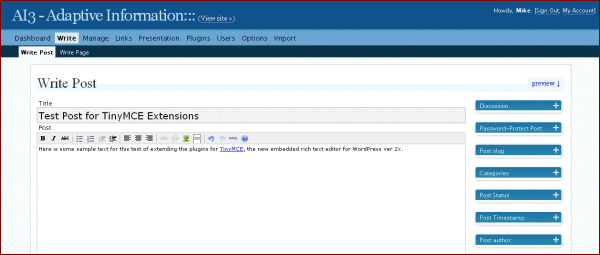
The only problem is that I have become used to editing support for items such as tables, image manipulation, special characters, font types, and so forth. While I (generally) edit and clean up the HTML before final posting, I very much enjoy the productivity benefits of a more full-featured WYSIWYG editor. So, the rhetorical question to myself was: If I’m going to use TinyMCE, how can I extend its functionality?
The Investigations Begin
Having been familiar with other TinyMCE instantiations, I began my investigations with the (as it turns out naà ¯ve) assumption that upgrading to a full featured TinyMCE would be a snap. Boy, was I wrong.
I first began with the TinyMCE Web site itself checking out the standard distribution package. Like many open source sites, I found the online documentation for TinyMCE to be fragmented, incomplete and hard to navigate. I looked under the ‘Plugins’ tab and found it was documentation for developers in creating a new plugin. My first lead came from the online manual (which can also be downladed for local browsing) and its reference to installation options, specifically these options at the bottom of that page:
Bingo! Clearly, TinyMCE had the advanced features I was seeking and they were packaged as part of the direct TinyMCE distribution to boot! Now I assumed my only needed step was to find how to “turn on” these features in my WordPress installation.
What Was Learned
This line of thinking led me to an unfortunate waste of time in Web search and poking through the forums at both the TinyMCE and WordPress sites. It became clear that the TinyMCE integration in WordPress was both highly tailored and limited to just the simple functionality (Example 00 above). I saw references by others to the “wisdom” of the WordPress developers to making this choice and therefore reducing the overall size of the WordPress download, but I don’t see it that way. It seems rather arbitrary and taking available choices from the user by unilaterally “whittling down” a more fully featured option from Moxiecode. Oh, well.
One dead end among many I pursued was instructions from the TinyMCE staff on integrating Moxiecode’s commercial plugins. That reference — http://tinymce.moxiecode.com/downloads/integration/ — got me way too into specific WordPress code that I was also unable to modify for my specific plugin purposes (though perhaps more capable programmers could have seen a clear path). I also found many requests but little guidance from the WordPress forums.
The first breakthough occurred on the TinyMCE Wishlist postings on the WordPress forum, which led me to the Advanced WYSIWYG plugin by Assaf Arkin of Labnotes. Part of the problem in finding this in the first place was that the actual plugin file name was misspelled as “advacned-wysiwyg”. So, I followed the instructions for the plugin and, voilÃ, it didn’t work!
Grr! More investigation indicated that the likely problem resided in new version 2x plugins for TinyMCE as NOT working with the Advanced WYSIWYG plugin. As Paul Finch reported on the Labnotes site, reverting back to earlier advanced plugins for TinyMCE in versions 1.45 and earlier, which could be found on the Sourceforge download site, solved the problem.
As indeed it does, as this updated editor on my blog administration panel shows:
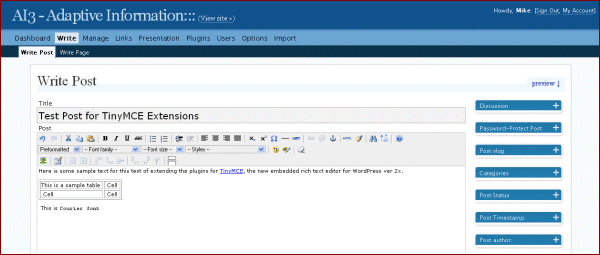
These “standard” advanced plugins for TinyMCE provide possible functionality beyond the simple installation (marked with an asterisk [*]) (also, ones I could not get to work — but I did not test all of them! — are shown with double asterisks [**]) for:
Default buttons available in the advanced theme:
* bold
italic
* underline
* strikethrough
* justifyleft
* justifycenter
* justifyright
* justifyfull
* bullist
* numlist
outdent
* indent
cut
copy
paste
* undo
* redo
* link
* unlink
* image
cleanup
help
* code
hr
removeformat
formatselect
fontselect
fontsizeselect
styleselect
sub
sup
forecolor
backcolor
charmap
visualaid
anchor
newdocument
separator
Plugins with the button name same as plugin name:
save
emotions
flash
iespell
preview
print
zoom
fullscreen
advhr
fullpage
spellchecker
Plugins with custom buttons:
advlink (will override the “link” button)
advimage (will override the “image” button)
** style
Early Use Observations
With one major exception — and it is MAJOR! — I have generally been pleased with the new TinyMCE editor in its full functionality version. I have been working with it for nearly a week and have completed four or five published posts. The writing of posts is now much quicker. There are no longer problems with line breaks and paragraph formatting. For most functionality, the editor just feels more “solid” than my previous Xinha editor. For all of that, I am very thankful.
The major issue I have encountered is with long posts (such as this one), particularly when I am toggling between the code (HTML) view and WYSIWYG view. Without warning, I will suddenly lose entire portions of text at the bottom of the post. This appears to be either strictly a TinyMCE issue or perhaps an issue related to my Firefox browser that others have noted on the WordPress forum.
Best practices, as I have reported on elsewhere and as part of my Guide, generally suggest drafting long posts external to WordPress anyway, though the loss of any work is distressing. I will monitor this “long posting” issue carefully, and until I see a resolution I will likely save to the clipboard or take other steps to prevent future losses.
Specific Upgrade Instructions
So, because I have generally been pleased with these extensions, I thought I would package and write them up for others to use, saving you the fits and starts I went through. The download at the top of this post includes the instructions and all files noted below. The instructions are included as the readme.txt file in the package. I also chose to make some minor updates to plugin operation (better sizing of popups, for example) and also corrected the spelling error in the file name and allowed for multi-line bullets for the extended TinyMCE in the Advanced WYSIWYW plugin. All of these changes, plus the vetted TinyMCE ver. 1.45 advanced plugins, are included in the distribution. Please note this information is being provided “as is”; you can also only do this if you have direct file access to your WordPress installation.
1. Download the enclosed zip file and unzip it to a clean subdirectory; these instructions are repeated in the enclosed readme.txt file.
2. If you don’t like the button order shown in the image above, you may remove buttons or change ordering or add or remove separator bars by editing the advanced-wysiwyg.php file:
< ?php
/*
Plugin Name: Advanced WYSIWYG Editor
Plugin URI: http://www.labnotes.org/
Description: Adds more styling options to the WYSIWYG post editor, updated for multi-line buttons.
Version: 0.3
Author: Assaf Arkin
Author URI: http://labnotes.org/
License: Creative Commons Attribution-ShareAlike
Tags: wordpress tinymce
*/
if (isset($wp_version)) {
add_filter(”mce_plugins”, “extended_editor_mce_plugins”, 0);
add_filter(”mce_buttons”, “extended_editor_mce_buttons”, 0);
add_filter(”mce_buttons_2″, “extended_editor_mce_buttons_2″, 0);
add_filter(”mce_buttons_3″, “extended_editor_mce_buttons_3″, 0);
}
function extended_editor_mce_plugins($plugins) {
array_push($plugins, “table”, “fullscreen”, “searchreplace”, “advhr”, “advimage”);
return $plugins;
}
function extended_editor_mce_buttons($buttons) {
return array(
“undo”, “redo”, “separator”, “cut”, “copy”, “paste”, “separator”, “bold”, “italic”, “underline”, “strikethrough”, “separator”,
“bullist”, “numlist”, “separator”, “indent”, “outdent”, “separator”,
“justifyleft”, “justifycenter”, “justifyright”, “justifyfull”, “separator”,
“sub”, “sup”, “charmap”, “hr”, “advhr”,”separator”, “link”, “unlink”, “anchor”, “separator”,
“code”, “cleanup”, “separator”, “search”, “replace”, “separator”, “wphelp”);
}
function extended_editor_mce_buttons_2($buttons) {
// the second toolbar line
return array(
“formatselect”, “fontselect”, “fontsizeselect”, “styleselect”, “separator”, “forecolor”, “backcolor”, “separator”,”removeformat”);
}
function extended_editor_mce_buttons_3($buttons) {
// These are the buttons for third toolbar line
return array(
“image”, “separator”, “tablecontrols”, “separator”, “fullscreen”, “wordpress”);
}
?>
3. Copy the resulting advanced-wysiwyg.php file into your standard WordPress plugins directory (wp-content\plugins)
4. Copy all files from the extracted plugins subdirectory to the TinyMCE plugins subdirectory in your WordPress directory (wp-includes\js\tinymce\plugins)
5. Under ‘Plugins’ in your WordPress administrative center, ‘activate’ the Advanced WYSIWYG Editor plugin
6. Now, when you write or manage posts or pages you will have the extended TinyMCE functionality available
7. Enjoy!
you written more nice stories before.
[...] WP-Plugin: Updated TinyMCE Extensions Updated set of plugins and multi-line buttons support for the Rich Text Editor in Wordpress. … includes WYSIWYG table editing, advanced image and horizontal rule support, search-and-replace, special characters, super- and subscripting, and fonts, colors and styles. Bookmark:These icons link to social bookmarking sites where readers can share and discover new web pages. [...]
[...] I just went to my Flickr pictures and picked out this daisy. I pasted the URL into the image insert field and chose align left and it worked. Not bad. I also clicked on the image and then clicked the link icon to see if I can set a link for the image. I think it worked. Here’s where I found the plug-in. Wow, that was cool. The link feature now let’s me choose whether to open the link in the same window or a new one. [...]
Thanks – this looks great.
One question though: Where can I download the emotions plugin?
Thank you
Halina
Very good. No need to be on the lookout for blogging editors anymore.
Thanks!
[...] Over at Mike Bergman’s AI3 blog site you can find instructions on implementing the advanced features found in TinyMCE. By default Wordpress installs a “limited feature set” of the TinyMCE rich text editor. But hey, sports fans, you’re not seeing the half of it if you don’t check this one out. [...]
This is for Halina,
You can find the ‘emotions’ plugin at (for the latest v. 2.061):
http://tinymce.moxiecode.com/download.php
Moxiecode’s instructions for installing it is at:
http://tinymce.moxiecode.com/tinymce/docs/plugin_emotions.html
I don’t know if this will work without change. If it doesn’t you may want to go to Sourceforge and get an older version; that seemed to work for the plugins I included with my distribution. Older versions at Sourceforge can be found at:
http://sourceforge.net/project/showfiles.php?group_id=103281
I know that versions 2.02 and 1.43 of TinyMCE come packaged with this plugin.
Good luck!
[...] There are plugins and there are plugins that made you go, “Whoopee!“. This is one of them. mkbergman’s Wordpress plugin that make noobs like me go crazy with adding colours, fonts, subscript, superscript and what nots with just a few clicks. [...]
cool! plugins
merci à vous
Hi Mike
Thank you so much for the links.
I understand very little of Wordpress, I’m afraid… Can you tell me in which file(s) I’m supposed to add the code?
Thanks!!
Halina
Halina,
Follow the instructions for the other plugins per my initial post. You will also need to edit the advanced-wywiwyg.php file by adding ‘emotions’ to one of the three button extended_editor_mce_buttons lines.
Mike
When I alter the button array, I then go to the PlugIns page and the text of the entire php file is shown as the PlugIn file. Any hints?
The good news is that my altered buttons look OK on the Entry page.
No, unfortunately I do not know why the php file is displaying. Perhaps another reader can offer an explanation.
Wow! This is so freaking cool. No more hassle to put in the html code.
[...] …the highlight of your waking hours (other than picture messages from an Ibiza-vacationing girlfriend) is the news of the new TinyMCE plugin version for Wordpress 2.x. [...]
[...] Fà ¥r se om jag blir tvungen att à ¥ka själv till gymmet i kväll, var inte helt säkert att Mattias kan men sà ¥nt är livet. Vore ju otroligt om vi lyckas fà ¥ ihop và ¥ra tider hela tiden. Tänkte även testa den nya infoga bild funktionen jag fick med när jag installerade “Extending TinyMCE” genom att bjuda pà ¥ en tjuvkik pà ¥ en av bröllopsbilderna som Marco Seiriö tagit. [...]
Thanks for this plugin!
This is a godsend, specifically for someone like me who’s trying to tailor WordPress into a formidable CMS for clients. Thanks for doing the hard work for us!
Extensiones de TinyMCE para Wordpress
TinyMCE es un editor de contenido escrito en Java por Moxiecode, adaptado para Wordpress e incluido en su distribucià ³n como un editor de posts WYSIWYG (”lo que ves es lo que obtienes”, por sus siglas en inglà ©s). Adaptive Information (AI3)…
[...] Extending TinyMCE, the WordPress Rich Text Editor [...]
Many thanks for the included zip package, just what I needed.
Just a note: If it doesn’t show up when you go to write or edit a post, be sure to force a refresh. Almost fooled me.
[...] Extending TinyMCE, the WordPress Rich Text Editor Replace standard WordPress WYSIWYG Editor (tags: tutorials wp plugins) [...]
Thanks Assaf.
Just installed and am testing. …
Works well though slower than no editor at all. Perhaps I will switch on TinyMCE just when I need it.
One bug I noticed immediately in my set-up.
When I place an image “right”, the editing window expands too far to the right. The final page is fine, however. This is in Firefox for Mac.
It is not clear in your notes that I need to CLICK “Use the visual rich editor” when writing on the Your Profile page under USERS. Seems this needs to be on as well as the plugin activated. Yes?
It is the best yet, no doubt. I appreciate it.
But the AJAX editing interface I really need (i.e. Writely) is not here yet.
The ‘paste’ plugin just won’t work.
Does this happen to you too?
Udi.
There is something strange. When I use “select color” for text, then Internet Explorer opens new window if I select color. In Firefox if I select color for text then window will close. I was try to fix this bug in wp-includes/js/tinymce/themes/advanced/jscript/color_picker.js, but I cann’t found error. Maybe someone know where I must fix some code?
[...] Updated TinyMCE Extensions aggiorna un insieme di plugin ed aggiunge il supporto a barre di pulsanti multiple per l’Editor Avanzato di Wordpress. †¦ comprende editor WYSIWYG per le tabelle, sistema avanzato per la gestione di immagini e separatori orizzontali, cerca e sostituisci, caratteri speciali, apici e pedici oltre che font, colori e stil. [...]
hi, i have install your plugin as you said but i always see the classic WP 2.0.4 tinymce editor!!!
cna you help me please?
thnaks a lot!
Great work, now my editor is very complete!
I have a question: how to integrate in this plugin the “pasteword” button?
I’ve tried a lot of time, but no result…help me!
Bye,
Gigi
I installed the plugin and it looked good – but I had a lot of probelms with teh table insertion
1. The icons did not appear they were invisible but when I cursored over them the were there
2. The table gest inserted with no lines so it si really hard to see where you are when you are filling in the table.
I then could not save/publish the content of a post and decided I would uninstall the plugin.
Then the defaulyt editor wont either.
I have re-installed the default wordpress scripts and still I canoto sav/publish posts -
I get the pop up box that says “You are navigating away from this page and all your conent will be lost..
What am I missing please ?
[...] Michael K. Bergman of AI ³ has just released a plugin that extends the default TinyMCE rich text editor in Wordpress 2.0+. This plugin will give you a full WYSIWYG editor for your Blog! Michael details his journey in putting together this plugin on his recent blog post, Extending TinyMCE, the WordPress Rich Text Editor. [...]
I have discovered a possible bug. With EditorMonkey, I had no problem with paragraph tags. With this plugin, I do. They do not get deleted from the posts, but they do not display when the posts are loaded. Instead, there are line breaks (not br tags) separating paragraphs. Obviously, browsers won’t treat those breaks as br tags. Any suggestions?
BTW, I switched to this plugin because EM is no longer supported and does not work properly with WP 2.0.4.
Here’s a stupid question: How do you get it to work for comments? I added the script to my comments.php but it’s not working.
(And yes, I refreshed. I even tried 2 different browsers so nyah nyah!
)
I’m using WP 2.0.4
Thanks
[...] Extending TinyMCE, the WordPress Rich Text Editor [...]
The sad part is that now TinyMCE supports Safari browsers (even your linked examples work on Safari), but as the TinyMCE version in Wordpress is so “integrated” there is no easy way to use this newer version with it.
*sigh*
[...] AI3 – Adaptive Information::: » Blog Archive » Extending TinyMCE, the WordPress Rich Text Editor [...]
got this Java Script error – Object Doesn’t support this property or method. And all buttons disappeared.
Anyone can help?
[...] Mike Bergman’s new WYSIWYG editor includes table editing, advanced image and horizontal rule support, search-and-replace, special characters, super- and subscripting, fonts, colors and styles. [...]
THANK YOU MIKE! Your work is, obviously, saving countless individuals a lot of time (and from the need to “reinvent the wheel” with each installation of Advanced WYSIWYG).
I had a quick question about the use the “Styles” Drop-down that I haven’t seen mentioned anywhere else.
While the Styles Dropdown appears within the Advanced WYSIWYG, I have not been able to find where to add/edit the styles in that dropdown menu. It only offers the styles of "mce_plugin_wordpress_more" and "mce_plugin_wordpress_page." So, I guess I need to know BOTH: how do I get that drop-down to list additional styles AND to which CSS file do I add the new styles?
Thanks again!
Thank you sooooo much!!!!
Is it known to work with WordPress 2.0.5? It doesn’t work over here…
bouke*at*altweb.nl
Hi, unfortunately, I have to second #42 in the replies section. I have installed v. 2.0.5 WP, but it does not show up after activating the plugin section. I tried installing the wp-includes/tinmce…/plugins (excuse the exact location) using all of your extended plugins in their orig. folder, and with the extended plugins extracted (mixed with the existing folders under the “plugins” section…neither function after activation. I aalso did NO editing to the wp-content/plugins/ .php file, just uploaded it as is.
Okay, it sounds like it would be super.
PS: I already have 2 other “attachment plugins” to the whysiwig (spelling?) editor installed, imageManager, and another image upload plugin – i only deactivated one, and tried re-activating your plugin, but it did not work.
Thanks for any response.
Claire
Works for me with 2.0.5. It didn’t at first. I had to start a new session of IE and then refresh. Then it worked.
One thing though, editing posts doesn’t work. Menu goes away and html tags stay. So you really can’t edit posts.
Any fix for this?
It does not work for me, either. I use Firefox 1.5.0.8 and Wordpress 2.0.5
Thanks for this excellent plugin! I love how you put the array functions right at the top and in such plain English. It made customization a real snap!
A big thank you for this plugin…works great. However, how do install other plugins like emoticons, flash movie, printing, and preview…. into the TinyMCE?
Now, that would be just wonderful!
Heya
Youre link for the Zip file is dead, is this fixable?
To All,
I think I now have the file permissions set correctly to download this zip file. I apologize for the snafu.
I also have tested the file against WP 2.05 and have corrected some popup dialog sizing issues.
Enjoy, Mike
Hey there. There are still issues with the accessibility of the file. If you want a second download site send me the file via email and I’ll post it on one of my domains for public download access and send you a link so you can post it here as well.
John and Others,
Thanks for finding still additional download problems and thanks to you, John, for offering to post an alternative download. However, I don’t think that will be necessary and FINALLY the download should work for all browsers.
It turns out that chmod on my host server needs to be set to allow execution for the zip files for Internet Explorer. The earlier chmod file access settings worked fine with Firefox. Oh, well . . .
Please post a message if new problems should arise.
Thanks, Mike
[...] Infine c’à ¨ un’ultima possibilità per gli utenti esperti di WordPress: installare questo plugin per trasformare l’editor visivo in quello di WriteToMyBlog, con tutte le sue numerose funzioni. [...]
[...] Advanced WYSIWYG editor for Wordpress Author: luigibio Michael K. Bergman of AI ³ has released a plugin that extends the default TinyMCE rich text editor in Wordpress 2.0+. This plugin will give you a full WYSIWYG editor for your Blog! Michael details his journey in putting together this plugin on his blog. This editor has can be considered a full WYSIWYG editor for Wordpress. Here are just a few of the features available: [...]
Mike,
This is perfect! I just installed WP 2.1b1 because I was itching for spellcheck and am tired of Chenpress. I simply added ’spellchecker’ into the array and it works!
Thank you so much for making this so easy for the rest of us!
Hi, Thanks for your work and making this available.
I have installed the plugin; with Firefox I only see buttons for search and replace and the drop-down menus. The style dropdown only shows names of 2 files:
mce_wordpress_plugin_page
mce_wordpress_plugin_more
I emptied the cache and reloaded the page as someone noted abvoe.
The plugin does work with I.E. except for the Styles dropdown as shown above.
What’s up with Firefox? 1.5.0.9 If part of the plugin shows why doesn’t all of it? I love the way this plugin sounds and would love for it to work but would hate to have to boot up IE to do that.
TJR,
I use Firefox myself and have had no problems (v 1.5x and 2.0x). It has also been validated for WP 1.6, 2.0 and 2.1b.
I guess all I can suggest is re-do the installation, following the steps very carefully. Maybe something else is going on, but I’m afraid I can’t diagnose it further.
Sorry I can’t be of more help.
Good luck, Mike
Mike,
Thanks for the quick reply. I’m still not able to get it to work with Firefox. As with #40 above, Copernicus,
I still have the issue in the Style dropdown only showing
mce_wordpress_plugin_page
mce_wordpress_plugin_more
This is true for Internet Explorer as well.
As for the ExtTinyMCE plugin,
I deleted the plugin completely;
deactivated all other plugins
redownloaded from here, reinstalled.
I also tried deleting the entire TinyMCE subdir. and downloaded another copy and reinstalled that, then again reinstalling the plugin.
I have javascript allowed and popups also.
It still doesn’t work completely with Firefox. I realize others have gotten it to work with Firefox — just letting you know what’s up.
TJR,
Wow, that sounds like alot of work and a royal pain in the ass. Sorry you spent so much time. Let’s hope that someone with more of a clue than I have can diagnose this fix and post it here.
Oh, well . . . .
Mike
[...] wordpress  http://www.arnebrachhold.de/redir/sitemap-home/ http://blog.igeek.info/wp-plugins/igsyntax-hiliter/ http://fucoder.com/code/toc-generator/ http://www.mkbergman.com/?p=275 [...]
Still trying…
FYI in the example above for the advanced_wysiwyg.php there is a space
oops…
a space at the opening php tag before the ?
it should be taken out — that is why #12 sees the code as text on the plug in page.
[...] Finally, for an enhanced TinyMCE editor within WordPress itself, try this plug-in available from Michael K. Bergman. [...]
Great Work, Mike, thanks a lot…
I am maintaining several blogs and CMS-Applications based on Wordpress and an enhanced editor has been on the list for quite some time.
One minor bug – table row props and table cell props delivered a 48px-wide-popup in Firefox 1.5, should have been 480, I discovered after clawing my way through wp-includes/js/tinymce/plugins/table/editor_plugin.js – I have no idea of how Javascript works, but got it working
Hi, Mike,
Because your plugin wasn’t working for me, I tried the Mudbomb WYSIWYG but had the same problem. One of the comments on that page had the answer. This could help other commenters on this page; perhaps you’d want to put this information in your readme file.
The Firefox problem is in usercontent.css. Some people may have added the adblocker code, as I had. Here’s the info from the post on Mudbomb:
After all this work, I did not reinstall your plugin as the Mudbomb editor is working great now, but I’m assuming this is the reason why yours wouldn’t work for me but did for other Firefox users.
TJR,
Super thanks for the great detective work. I will add to the next update of the readme file, plus fix the popup sizing mentioned by Peter.
Thanks, Mike
Works Great!
Thanks so much.
Steve,
Joomple.com
All what I can see after the installation is: Same buttons (options) as before…but now they just show up as text. No images anymore to press. I tried to install and also reinstall everything but always the same. IE show the same as FF. What ´s wrong ?
I use Wordpress 2.0.6
[...] I also used a newer version of the advanced config that was located at http://www.mkbergman.com/?p=275. [...]
[...] The highly anticipated Wordpress v2.1 was released today. That meant that I had to upgrade my blog. The upgrade itself wasn’t that hard. Especially when one follows the upgrade instructions. During the ‘research’ on upgrading, I found a Wordpress plugin on extending the WYSIWYG editor called ‘Advanced WYSIWYG Editor‘, and a good desciption on installing it. [...]
You rock buddy. Thanks for taking the time to share with us. Huge time saver.
i desperately want this (or any more robust wysiwyg editor) to work properly with wordpress but i’m about to give up and just switch blog scripts.
anyway, the issue that i keep running across with this particular plugin is that i can’t get it to save posts……i get a “are you sure you want to navigate away from this page” message.
i’ve tried it on 3 installs now – most recently on a clean install of wp 2.1 with no other plugins at all and no edits done other than to move some buttons from line 1 to line 2.
any ideas and thx for ur efforts ?
This is such a neat tool and when making a new post it works a treat.
My problem is like the one teros posed above …
When I edit an existing page and then select SAVE, I get the message “Are you sure you want to navigate away from this page”.
If I select NO, I remain in edit (but not saved) mode.
If I select YES, no edits are applied.
Can anyone help?
Hi Rob and Teros,
I myself have not yet upgraded to WP 2.1 (am presently at WP 2.0.5) and since that common to both of you, I suspect the problem may reside there. It is not unusual for new WP versions to introduce bugs that then get cleaned up with the next release. I will wait until 2.1.1 or higher for my own upgrade, and then attempt to more directly address this problem should it remain.
Thanks, Mike
Looks like a wonderful plugin, and everything seems to work so far, however the icon bars are extending so far to the right that even three of the covered icons are rendered useless — the search icon, the help icon, and one between them (I can’t make out what it is, but there are dotted lines connected to an arrow pointing to a letter “B”).
Any ideas?
Thanks
Oops, should have said the icons on the right are covered by the setting panels on the right of the Write Post editor – “Discussion – +,” “Password-Protect Post – +,” etc.
It’s been a long week.
With some hacking directly into Wordpress code works just fine with Wordpress 2.0.3.
I just installed v.2.12 and I’ve encountered the same problem as Rob and cannot apply my edits when I’ve installed the TinyMCE plugin.
For those who have upgrade to 2.1.2 and are having problems the “Are you sure you want to navigate away from this page…”, I think I have a fix. The version of TinyMCE being used by WordPress is 2.0.8. I downloaded the 2.0.8 code from
http://sourceforge.net/project/showfiles.php?group_id=103281
Unzip or untar it, extract and use the plugins from that version instead of the ones that Mark included in his ExtendedTinyMCE.zip file. I have not tested all the plugins but it does seem to solve the problem.